
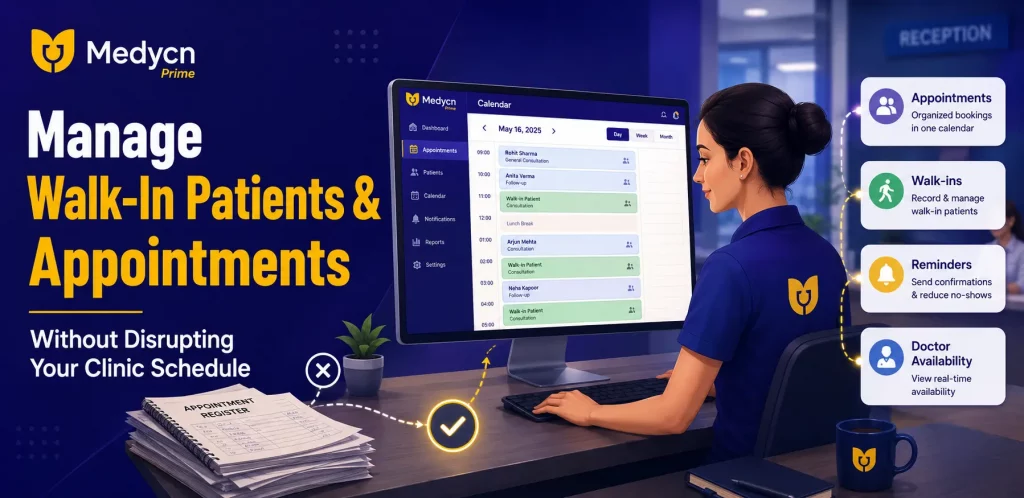
A clinic may have a full appointment schedule in the morning, but that does not always mean the day will go as planned. A patient may arrive late, another may need extra consultation time, and someone without an appointment may walk in expecting to see the doctor immediately.
For doctors and clinic staff, managing these situations can be challenging. When appointments and walk-in visits are handled without a clear process, waiting times can increase, reception staff may feel overwhelmed, and the entire clinic schedule can fall behind.
The good news is that a few practical changes can help clinics manage both appointment-based visits and walk-in patients more efficiently. With a structured scheduling process and the right clinic appointment scheduling software, doctors can maintain a more organized daily workflow.
What Is Walk-In Patient Management?
Walk-in patient management is the process of handling patients who visit a clinic without booking an appointment in advance.
Unlike scheduled appointments, walk-in visits are difficult to predict. Several patients may arrive at the same time, or an unexpected consultation may overlap with an existing booking.
A well-organized walk-in patient management process helps clinics balance these visits with scheduled appointments. It involves maintaining an updated appointment list, checking doctor availability, communicating expected waiting times, and keeping reception staff informed about schedule changes.
For clinics that receive both booked and unplanned visits, having a clear process can make daily operations easier to manage.
Why Do Clinics Struggle to Manage Appointments and Walk-In Visits?
Before improving the appointment process, it helps to understand what causes scheduling problems.
1. Too Many Patients Arrive at the Same Time
Some clinics experience a rush during particular hours, especially in the morning or evening. Even when appointments are available throughout the day, patients may prefer the same time slots.
This creates pressure on reception staff and makes it difficult to manage the order of consultations.
2. Consultation Times Vary
Not every consultation takes the same amount of time. A routine follow-up may be relatively short, while a new consultation may require more discussion and documentation.
When the schedule does not account for these differences, later appointments can be delayed.
3. Walk-In Visits Interrupt Scheduled Appointments
Walk-in patients may need attention even when the doctor already has a full schedule. Without a clear process for assessing availability and arranging the next suitable slot, reception staff may struggle to decide how to accommodate them.
4. Manual Appointment Registers Become Difficult to Maintain
Paper registers can work for smaller practices, but keeping them updated becomes harder when appointments are frequently added, cancelled, or rescheduled.
If the reception team and doctor are working with different information, scheduling conflicts become more likely.
5. Patients Do Not Know How Long They Need to Wait
When patients receive no clear information about delays, they may repeatedly ask the reception staff for updates.
Providing realistic waiting-time estimates and communicating delays can help create a better experience, even when the clinic is busy.
7 Practical Ways to Manage Walk-In Patients and Appointments
1. Create a Clear Appointment Scheduling Process
Start by organizing the clinic’s daily schedule before consultations begin.
Maintain an updated list of appointments, including the doctor’s availability, scheduled consultation times, and any known breaks. Reception staff should have a clear view of the day’s bookings so they can identify available slots before confirming new appointments.
It is also useful to establish a consistent process for handling cancellations and rescheduling requests.
A digital appointment scheduling system for clinics can make this process easier by keeping appointment information organized and reducing dependence on handwritten registers.
2. Keep a Separate Process for Walk-In Patients
Walk-in patients should be recorded as soon as they arrive, rather than being managed through informal verbal communication alone.
Reception staff can note the arrival time, the reason for the visit, and whether the patient can wait for the next available consultation slot. The clinic can then decide how to accommodate the visit without losing track of existing appointments.
Where the clinic’s workflow allows, scheduled appointments and walk-in visits can be coordinated through a shared schedule.
This approach helps staff understand who has arrived, which appointments are approaching, and when the doctor may be available.
3. Estimate Consultation Times Realistically
One common scheduling mistake is assigning the same amount of time to every consultation.
Instead, clinics should review their typical consultation patterns and plan appointment slots accordingly. New consultations, follow-up visits, and procedures may require different amounts of time depending on the specialty and the individual case.
It is also helpful to allow some flexibility for unexpected delays.
Realistic scheduling does not eliminate every waiting-time problem, but it can make the daily schedule more manageable.
4. Confirm Appointments and Send Reminders
Missed appointments can leave unexpected gaps in the doctor’s schedule. Late arrivals can also affect patients who are booked immediately afterward.
Appointment confirmations and reminders can help patients remember their scheduled visits and give them an opportunity to request changes in advance.
Clinics can establish a simple reminder process using their existing communication methods or suitable appointment management software.
Where automated reminders are available, they can reduce the amount of manual follow-up required from reception staff.
5. Keep Reception Staff and Doctors Updated
Appointment management should not depend on one person remembering every schedule change.
If a doctor is running late, a consultation takes longer than expected, or an appointment is cancelled, the relevant staff should receive the updated information.
A shared appointment schedule helps the reception team and doctor work from the same information. It also makes it easier to communicate delays and offer alternative appointment times when necessary.
Clear communication between the front desk and consultation rooms is especially important for clinics with multiple doctors.
6. Track Waiting Times and Identify Busy Hours
Clinics can improve scheduling by reviewing their daily appointment patterns.
For example, the reception team may notice that most walk-in visits occur after 6 PM, while scheduled consultations are concentrated in the morning. Another clinic may experience delays because new consultations regularly take longer than the allocated slot.
Recording basic information about arrival times, delays, cancellations, and missed appointments can help identify these patterns.
Doctors and clinic administrators can then adjust appointment slots, staff availability, or scheduling practices based on what they observe.
7. Use Clinic Appointment Scheduling Software
When appointment volumes increase, managing bookings through registers, spreadsheets, and separate communication tools can become difficult.
Clinic appointment scheduling software helps organize appointment information digitally. Depending on the system, it may allow clinics to view schedules, manage bookings, update appointment details, and coordinate visits alongside other administrative activities.
An integrated clinic management system can also connect appointment workflows with digital records and billing, reducing the need to manage each activity separately.
When evaluating software, clinics should check whether its features support their actual scheduling needs, including the way they handle walk-ins, cancellations, multiple doctors, and appointment reminders.
How Can Clinics Reduce Waiting Times Without Rushing Consultations?
Reducing waiting times does not mean every consultation needs to be shorter. Doctors must still have enough time to understand the patient’s concerns and provide appropriate attention.
Clinics can instead focus on reducing avoidable delays.
A few useful practices include:
- Avoid booking every appointment at the same time.
- Allow realistic consultation slots based on the clinic’s experience.
- Keep appointment and doctor availability information updated.
- Inform patients when significant delays occur.
- Record walk-in visits instead of managing them informally.
- Review recurring delays and adjust the schedule when needed.
The goal is to create a predictable workflow while allowing enough flexibility for unexpected situations.
What Should You Look for in Clinic Appointment Scheduling Software?
Choosing software involves more than checking whether it can record an appointment. The system should fit the clinic’s daily workflow and be easy for doctors and reception staff to use.
Here are some important features to consider.
Appointment calendar: The system should make it easy to view upcoming appointments and doctor availability.
Appointment updates: Staff should be able to maintain accurate booking information when visits are cancelled, rescheduled, or changed.
Digital patient records: Access to relevant consultation history can help doctors prepare for follow-up visits without searching through multiple paper files.
Reminders and communication: Check whether the software supports the reminder methods your clinic needs.
Billing integration: Connecting appointments with billing can reduce repetitive administrative work, depending on the system’s capabilities.
Reports and analytics: Appointment and operational reports can help clinics understand booking patterns and identify recurring scheduling problems.
Ease of use: A system should be straightforward enough for the clinic team to use consistently throughout a busy day.
The right choice depends on the clinic’s size, specialty, budget, and existing workflow.
How Medycn Prime Helps Clinics Organize Daily Operations
Medycn Prime is clinic management software designed to help doctors and clinic teams manage everyday clinic activities through a centralized platform.
Its clinic-management capabilities include appointment scheduling, digital records, electronic prescriptions, billing, inventory, expense management, and reports. Bringing these activities together can help reduce dependence on disconnected administrative processes.
For clinics looking to improve appointment organization, digital scheduling can provide a clearer view of bookings and support better coordination between the doctor and reception team.
The specific features available should be reviewed against the clinic’s requirements, particularly if the practice needs a dedicated queue-management or walk-in prioritization feature.
Clinics can explore Medycn Prime to understand how its available features fit their daily workflow.
Final Thoughts
Managing walk-in patients alongside scheduled appointments is a common challenge for clinics. Without a clear process, unexpected visits, consultation delays, and last-minute schedule changes can disrupt the entire day.
A more organized approach starts with realistic scheduling, clear communication, proper recording of walk-in visits, and regular reviews of waiting-time patterns.
For clinics that are still relying on manual registers and disconnected tools, clinic appointment scheduling software can be a practical step toward better-organized daily operations.
Medycn Prime offers digital clinic-management features that doctors and clinic teams can explore to see whether they fit their scheduling and administrative needs.
Explore Medycn Prime to see how digital clinic management can support a more organized clinic workflow.
Frequently Asked Questions
1. How can a clinic manage walk-in patients and scheduled appointments together?
A clinic can maintain an updated appointment schedule, record walk-in arrivals, check doctor availability, and assign suitable consultation times. Clear communication between reception staff and doctors helps prevent avoidable scheduling conflicts.
2. How can clinics reduce patient waiting times?
Clinics can use realistic appointment slots, avoid overcrowding particular time periods, communicate delays, and review the reasons for recurring scheduling problems. Digital appointment scheduling can also help staff keep booking information organized.
3. What is the difference between appointment scheduling and queue management?
Appointment scheduling organizes visits around planned time slots. Queue management helps organize the order in which people are attended to. Clinics that handle both booked appointments and walk-in visits may need processes for coordinating the two.
4. Is appointment scheduling software useful for small clinics?
Yes. Small clinics can benefit from digital scheduling when they need to organize bookings, manage changes, and keep appointment information accessible. The usefulness depends on the clinic’s daily workload and the features included in the software.
5. Can clinic management software help reduce missed appointments?
Software with appointment confirmation and reminder capabilities can help patients remember scheduled visits. The actual impact depends on the reminder process, patient response, and how the clinic handles cancellations and rescheduling.