Going digital sounds like it should make a clinic easier to manage.
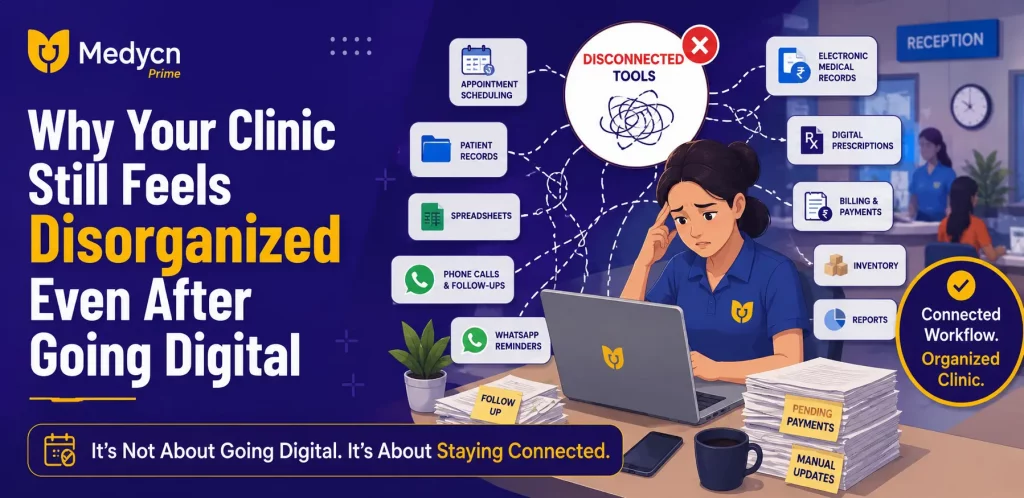
You may already be using a computer for patient records, a mobile app for appointments, WhatsApp for reminders, spreadsheets for expenses, and another system for billing. On paper, everything is digital.
But somehow,you staff are still busy looking for information, calling patients,checking messages,updating spreadsheets, and asking each other for details.
That is the part many clinics overlook.
Going digital is not the same as having a connected clinic workflow.
When Everything Is Digital but Nothing Is Connected
A clinic can use several digital tools and still have the same problems it had with paper.
For example, an appointment may be booked in one system, the patient’s previous records may be stored somewhere else, payment details may be maintained separately, and follow-up information may depend on a staff member remembering it.
Each tool may be perfect on its own.
The problem starts when the information needs to move from one place to another.
This is where a clinic management software can make a practical difference. Instead of managing individual tasks through disconnected tools, clinics can bring important daily activities into one organized workflow.
5 Signs Your Clinic Workflow Is Still Too Disconnected
1. Your Staff Keep Entering the Same Information
If patient details have to be entered multiple times, your team is spending time on work that should not need to be repeated.
A patient’s information may first be collected while booking an appointment and then entered again during registration or billing.
Apart from taking extra time, repeated data entry can also lead to mistakes.
A connected clinic management system can help keep patient information available across relevant clinic activities.
2. Finding a Patient’s Previous Information Takes Too Long
A patient came back after a few months.
The receptionist searches for the name.Someone checks an old file.Another person looks through the computer.The doctor waits.
This may only take a few minutes,but when it happens throughout the day, those minutes add up.
Digital patient records can make previous visit information easier to find when it is needed.
The goal is not simply to store more information. It is to make the information easier to access during everyday clinic work.
3. Appointments Are Managed in One Place and Follow-Ups Somewhere Else
Appointment scheduling does not end when a patient gets a time slot.
There may be rescheduling, cancellations, follow-ups, reminders, repeat visits and missed appointments to manage.
If these activities are being handled through calls, notebooks or separate messaging tools, it becomes difficult for staff to maintain a clear picture of the day’s schedule.
4. Billing and Clinic Activity Are Kept Separately
Billing is not an isolated task.
A patient’s visit, the services provided, payment status and other information are all connected to the clinic’s daily activity.
When financial records are maintained separately from the rest of the workflow, staff may need to switch between systems or update information manually.
Bringing billing and payment information into the same clinic management platform can make everyday administration easier to track.
5.You Still Depend on One Person to Know “What Happened”
This is one of the clearest signs that a clinic needs a better system.
If one receptionist knows which patients have pending payments, another staff member remembers who needs a follow-up call, and the doctor has to ask someone about yesterday’s appointments,important information is living with people instead of the system.
A good digital workflow should make important information accessible to authorized users without depending on someone’s memory.
The Real Problem Isn’t Always a Lack of Software
Sometimes the answer is not to add another application.
In fact, adding more tools can make things even more complicated.
The better question is:
“How many different places does my clinic need to check to complete one patient’s visit?”
If every step happens in a different place, your staff are constantly moving information between systems.
If these activities are connected, the workflow becomes much simpler.
That is the real value of digital clinic management.
What a Connected Clinic Workflow Looks Like
A connected workflow does not mean every task has to be automated.
It means the important information is available where it is needed.
For example, when a patient arrives for an appointment, the clinic team should be able to quickly identify the patient, check the appointment, access relevant records, complete the consultation workflow and handle the payment without jumping between several disconnected systems.
This can make everyday work more predictable for both doctors and staff.
It also makes it easier to see what is happening across the clinic rather than looking at individual tasks separately.
Where Clinic Management Software Can Help
A clinic management system can bring several everyday activities together, including:
- Appointment scheduling
- Patient registration and records
- Electronic medical records
- Digital prescriptions
- Billing and payments
- Inventory tracking
- Expense management
- Patient reminders
- Reports and analytics
The benefit is not simply having all these features listed in one product.
The important part is how they work together.
For example, appointment information can sit alongside patient information, while billing, reports and other operational details can be managed through the same system.
That reduces the need to repeatedly move information from one tool to another.
You Don’t Have to Change Everything at Once
One reason clinics hesitate to move to a digital system is the fear that the entire workflow will have to change overnight.
It doesn’t have to.
A clinic can start by identifying the areas that consume the most time.
Is it appointment management?
Patient records?
Billing?
Inventory?
Follow-ups?
Once the biggest source of manual work is identified, the clinic can focus on improving that workflow first.
Over time, other processes can be brought into the same system.
The goal is not to make the clinic more complicated by adding technology. It is to remove unnecessary steps.
How Medycn Prime Fits Into This Workflow
Medicine Prime is designed to bring everyday clinic activities into one centralized platform.
Clinics can manage appointments, patients records, digital prescriptions, billing, inventory,expenses, reminders and reports through the platform.
Its cloud-based approach also allows clinic information to be accessed through supported devices instead of depending entirely on physical records or a single computer.
For a clinic that is already using different digital tools but still feels that its daily workflow is fragmented, the value is not simply moving from paper to software.
It is about bringing the workflow together.
Before Choosing Clinic Management Software, Look at Your Actual Workflow
Instead of starting with a list of features, start with your clinic’s day.
Ask your staff:
Where do you spend the most time?
Where do mistakes usually happen?
Which information is difficult to find?
Which tasks are repeated every day?
Which processes still depend on phone calls, notebooks or spreadsheets?
These answers will tell you more about what your clinic needs than a long software feature list.
The right clinic management software should fit into the way your clinic works and make that workflow easier not create another system for your staff to manage.
Frequently Asked Questions
1. Why does my clinic still feel disorganized after going digital?
Using multiple disconnected tools can create the same problems as manual processes. A connected clinic management system can bring appointments, patient records, billing and other activities into one workflow.
2. What is a connected clinic workflow?
A connected clinic workflow allows important information to move between related activities such as appointments, patient records, consultations, billing and follow-ups without requiring staff to repeatedly enter the same information.
3. Can clinic management software reduce repetitive work?
Yes. Depending on the system, clinic management software can reduce repetitive tasks by keeping patient information, appointments, billing and other operational details organized in one platform.
4. Is clinic management software useful for small clinics?
Yes. Small clinics can use clinic management software to organize appointments, patient records, billing, prescriptions and other routine activities without relying heavily on paper files or separate spreadsheets.
5. What should I check before choosing clinic management software?
Look at your actual clinic workflow first. Consider appointment management, patient records, billing, inventory, reports, ease of use, cloud access, support and whether the software can grow with your clinic.